Key Benefits
- Eliminates manual data entry Tracking numbers and freight costs flow directly from the carrier file, removing keying errors and saving time.
- Enables one click freight tracking Tracking numbers are stored with each shipment. With the SCAC Code Maintenance (TSCAC) app, you can link each carrier to its tracking URL and access real time shipment status right from PowerShift.
- Automates freight invoicing Freight charges can be automatically added to customer invoices with improved accuracy and consistency.
- Improves customer service When packing lists or invoices include tracking links, customers can check shipment status themselves — fewer Has it shipped yet? calls and faster answers.
How It Works
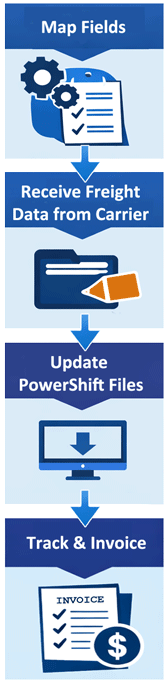
A mapping tool lets you align each field from the carrier’s export file to its corresponding PowerShift data element. Once mapped:
- Add the export step to the carrier system’s end of day process.
- Import the file into PowerShift after shipments are confirmed but before invoices are generated.
- PowerShift updates each package with its freight details and applies the correct freight charges based on payment terms and freight rules.
Carrier discounts are supported, and you can choose to add flat fees or up charges before freight is applied to the invoice.
Carrier discounts are supported, and you can choose to add flat fees or up-charges before freight is applied to the invoice.
Tracking numbers are added automatically, and tracking URLs can be included in emailed documents. Customers can click directly to see shipment status, improving transparency and reducing support workload.
Want to Learn More?
Contact the Qantel Helpdesk to learn explore the benefits of manifest data interface or other PowerShift features. |